今天把博客,从码云的 gitpages 服务,迁移到了自己的服务器上,记录分享一下。
原因
至于为什么不用 github 的 gitpages,主要是打开太慢了。。
码云的 gitpages 部署之后,需要手动去更新一下才能生效。
码云的 gitpages 有时会抽风,遇到过两次一直在部署中,无法操作的情况。
原来用第三方的原因是,自己的服务器搭梯子经常被封,中间有段时间没买服务器;但是呢,七牛云的免费额度只有 http 请求,所以前端时候在服务器搞了个反向代理。就是 https 站点 -> https图片资源 -> http图片资源 这么一个过程。。所以服务器就不能停了,不然博客的图片就全部要挂了。
准备工作
- 一台服务器
- 安装 nginx,go,docker。容器化部署nginx教程
- 代码仓库设置一个 webhook
自动部署
自动部署大概流程是这样
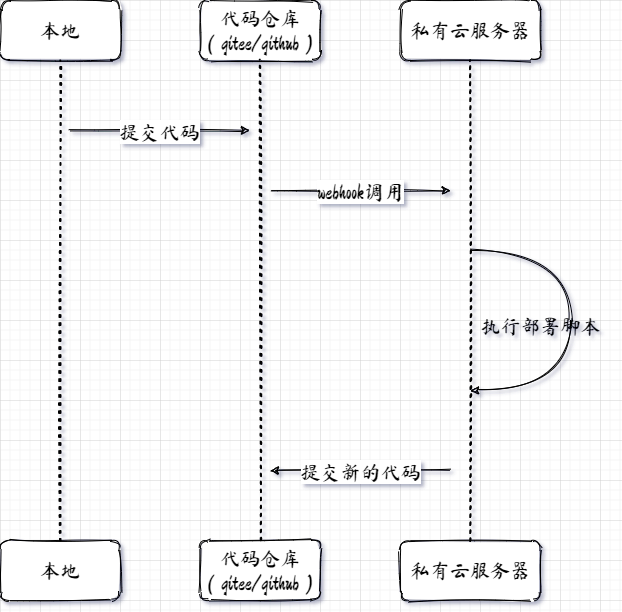
自动部署脚本大概长这样:
1
2
3
4
5
6
7
8
9
10
11
12
13
| cd /root/codespace/blog &&
git checkout hexo &&
git pull &&
rm -rf .deploy_git &&
hexo clean &&
hexo g &&
hexo d &&
git add . &&
git commit -m '自动部署博客' &&
git push &&
rm -rf /root/nginx-docker/html/blog/ &&
cp -r public/ /root/nginx-docker/html/blog &&
docker restart mynginx
|
监听 webhook,调用自动部署的服务长这样:
代码地址,直接编译成二进制文件拖到一个目录下就行
1
2
3
4
5
6
7
8
9
10
11
12
13
14
15
16
17
18
19
20
21
22
23
24
25
26
27
28
29
30
31
32
33
34
35
36
37
38
39
40
41
42
43
44
45
46
47
48
49
50
51
52
53
| package main
import (
"encoding/json"
"flag"
"fmt"
"log"
"net/http"
"os/exec"
"time"
)
var lastDeployTime time.Time
var password *string
var shellPath *string
func main() {
password = flag.String("p", "", "webhook password")
shellPath = flag.String("s", "", "shell path")
flag.Parse()
http.HandleFunc("/gitee/blog/deploy", doDeploy)
err := http.ListenAndServe(fmt.Sprintf(":%d", 8088), nil)
if err != nil {
log.Fatal("http ListenAndServe fail:", err)
}
}
func doDeploy(w http.ResponseWriter, r *http.Request) {
var body map[string]string
decoder := json.NewDecoder(r.Body)
decoder.Decode(&body)
if body["password"] != *password {
fmt.Printf("%s: 密码错误: %s \n", time.Now().Format("2006-01-02 15:04:05"), body["password"])
return
}
if time.Now().Sub(lastDeployTime) < 120*time.Second {
fmt.Printf("%s: 部署操作冷却中...最后部署时间: %v \n", time.Now().Format("2006-01-02 15:04:05"), lastDeployTime)
return
}
lastDeployTime = time.Now()
cmd := exec.Command("/bin/bash", "-c", *shellPath)
output, err := cmd.Output()
if err != nil {
fmt.Printf("Execute shell failed: %+v, commands: %s", err, string(output))
}
}
|
代码中,加了一个冷却时间是因为,部署完成之后需要把新的代码提交上去,这时候又会触发 webhook,没有冷却时间会死循环。。
总结
过程一波三折,遇到的问题基本都能 google 解决掉
最终效果是,写完博客,只需要提交代码,稍等片刻刷新博客就可以看到新的提交内容了